Paint Engine

First Painted Stroke

The paint engine renders brushstrokes as dab sequences onto a tiled raster surface. Everything is procedural — no bitmap textures.

(require '[eido.core :as eido])

;; A single painted path with pressure
{:image/size [800 400]
 :image/background [:color/rgb 252 250 242]
 :image/nodes
 [{:node/type :shape/path
   :path/commands [[:move-to [60 200]]
                   [:curve-to [200 80] [350 320] [740 160]]]
   :paint/brush :ink
   :paint/color [:color/rgb 15 10 5]
   :paint/radius 9.0
   :paint/pressure [[0.0 0.1] [0.3 0.9] [0.7 0.6] [1.0 0.05]]}]}
Rendered output

Add :paint/brush to any path and it becomes a painted stroke. The :paint/pressure curve maps stroke parameter t (0 = start, 1 = end) to pressure, which scales radius and opacity.

Brush Presets

Built-in presets cover common media. Each is a full brush spec you can override:

;; Use a preset directly
:paint/brush :chalk

;; Override specific parameters
:paint/brush {:brush/type :brush/dab
              :brush/tip {:tip/shape :ellipse
                          :tip/hardness 0.5
                          :tip/aspect 2.0}
              :brush/grain {:grain/type :fiber
                            :grain/scale 0.06
                            :grain/contrast 0.5}
              :brush/paint {:paint/opacity 0.12
                            :paint/spacing 0.04}}

Available presets: :pencil, :marker, :airbrush, :chalk, :ink, :oil, :watercolor, :pastel.

Shared Surfaces

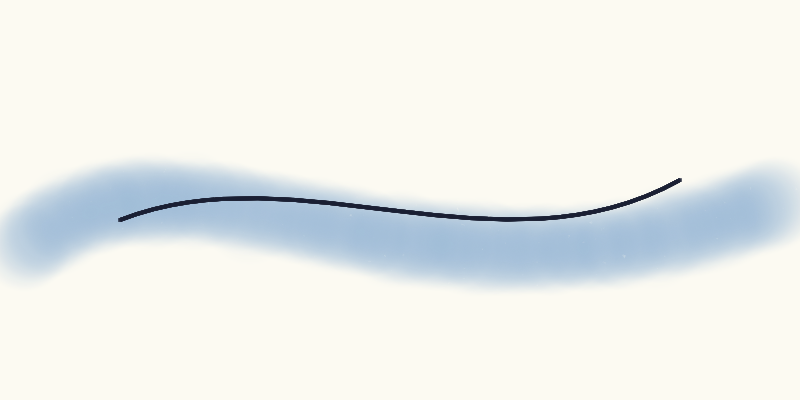
For multiple strokes on one canvas (e.g. layered watercolor), use a group with :paint/surface:

{:node/type :group
 :paint/surface {:substrate/tooth 0.3}
 :group/children
 [{:node/type :shape/path
   :path/commands [[:move-to [20 250]]
                   [:curve-to [200 100] [400 350] [780 200]]]
   :paint/brush :watercolor
   :paint/color [:color/hsl 210 0.45 0.65]
   :paint/radius 45.0}
  ;; Ink detail on top
  {:node/type :shape/path
   :path/commands [[:move-to [120 220]]
                   [:curve-to [300 150] [500 280] [680 180]]]
   :paint/brush :ink
   :paint/color [:color/rgb 25 30 50]
   :paint/radius 2.5}]}
Rendered output

Or use the standalone :paint/surface node with explicit point data for full control over pressure, speed, and tilt per point.

Composing with Generators

Paint parameters flow through generators. Put a flow field inside a paint group and every streamline becomes a painted stroke:

{:node/type :group
 :paint/surface {:paint/size [700 700]}
 :group/children
 [{:node/type :flow-field
   :flow/bounds [40 40 620 620]
   :flow/opts {:density 18 :steps 50
               :noise-scale 0.005 :seed 33}
   :paint/brush :ink
   :paint/color [:color/rgb 20 15 10]
   :paint/radius 1.8}]}
Rendered output

This works with any generator: :scatter, :symmetry, :flow-field, :path/decorated. The paint parameters propagate from the generator node to all its generated paths.

Grain and Substrate

Grain textures modulate deposition inside the brush tip. Substrate describes the paper/canvas surface. Both are procedural:

;; Grain: breaks up the stroke with texture
:brush/grain {:grain/type :fiber    ;; :fbm :ridge :weave :canvas
              :grain/scale 0.06
              :grain/contrast 0.5
              :grain/stretch 4.0}

;; Substrate: paper tooth blocks paint in valleys
:paint/surface {:substrate/tooth 0.4
                :substrate/scale 0.1}
Rendered output

Available grain types: :fbm (general), :fiber (directional), :weave (canvas), :ridge (sharp), :turbulence (billowy), :canvas (weave + fine noise).

Bristle Brushes

Add :brush/bristles to create multi-tip brushes that show individual hair marks:

:brush/bristles {:bristle/count 9
                 :bristle/spread 1.0
                 :bristle/shear 0.15}
Rendered output

Bristles are arranged perpendicular to the stroke direction. :bristle/spread controls width, :bristle/shear adds a fan effect. Each bristle gets subtle opacity and size variation for a natural look.